Controlled Airspace
Introduction
In the UK, the difference between a CTR and an FRZ is often the biggest point of confusion for new pilots. Many apps (like DJI Fly or NATS Drone Assist) shade both in red, making it look like you can't fly in either without a permit.
As a drone pilot, you must adhere to all airspace rules and regulations laid out by the CAA and international law. One area that often causes confusion is the presence of large, red areas around aerodromes on drone maps: the CTR (Controlled Traffic Region) and the FRZ (Flight Restriction Zone).
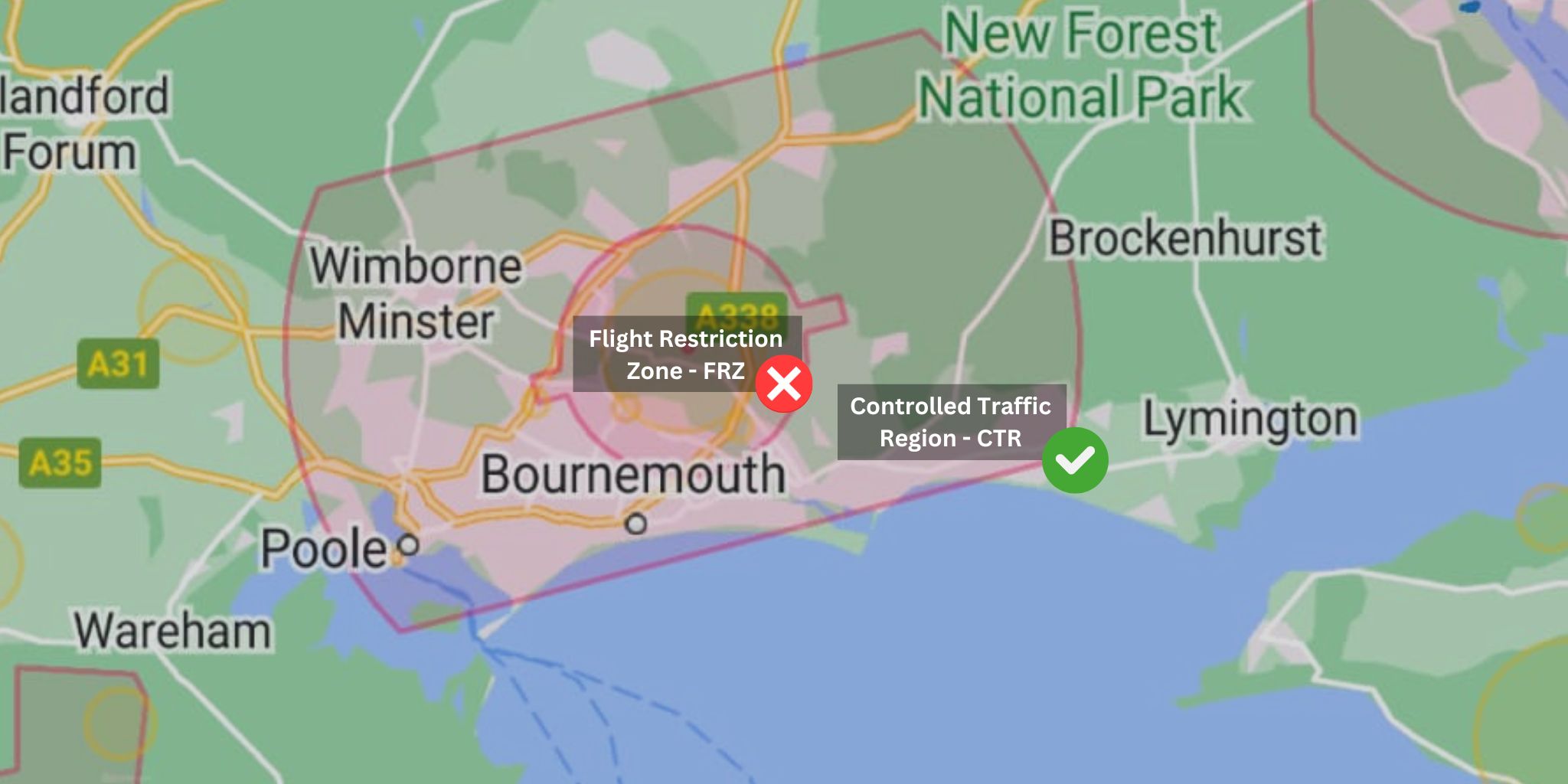
The CTR (Control Zone)
Think of the CTR as a massive "caution" area. It is a large volume of controlled airspace designed to protect manned aircraft (like holiday jets) as they approach or depart an airport
- The Rule: You can fly here without any special permission from Air Traffic Control (ATC), provided you stay in the Open Category (below 120m/400ft).
- Why?: Manned aircraft are not supposed to be below 500ft in these areas unless they are taking off or landing. Since you are legally capped at 400ft, there is a built-in safety buffer.
- Your Drone: Whether it's a sub-250g "Mini" or a UK1/C1 drone, you are free to fly in the CTR as long as you aren't also inside the FRZ.
The FRZ (Flight Restriction Zone)
The FRZ is the "hard no" zone. This is a much smaller area immediately surrounding the airport's runways and boundaries.
- The Rule: It is illegal to fly any drone (even a 249g toy) inside an FRZ without specific permission from the airport’s Air Traffic Control.
- The Shape: It’s usually a 2–2.5 nautical mile radius circle around the airport, plus "Runway Protection Zones" (5km long rectangles) extending from the ends of the runways.
- Your Drone: Your drone's weight or class (C0, UK1, etc.) does not matter here. If you are inside those lines, you need a permit.
Flying In CTR And NOT An FRZ
To fly legally without permission while inside a CTR, follow these steps:
- 1. Use The Drone Map or similar app like Drone Scene or NATS Drone Assist.
- 2. Identify the layers:
- The CTR will look like a large, light-red or shaded box/shape.
- The FRZ will be a smaller, darker, or more specific shape (usually a circle with two long "ears" for the runways) nested inside the CTR.
- 3. Stay Outside the Inner Lines: As long as your takeoff point and flight path are outside the FRZ boundary but inside the CTR, you do not need to call ATC or ask for permission.
- 4. Follow the Drone Code: You must still stick to the standard rules:
- Stay below 120m (400ft).
- Maintain Visual Line of Sight (VLOS).
- For UK1/C1 drones: Ensure you have your Flyer ID and Operator ID (and for C1/UK1, Remote ID must be active).
- For sub-250g/C0: You only need an Operator ID if it has a camera.
For a deeper dive into how these zones work in practice, watch the video